I have an nvim theme called Boring Tomorrow that highlights different things in and around the code than most of the themes. I have a post about it.
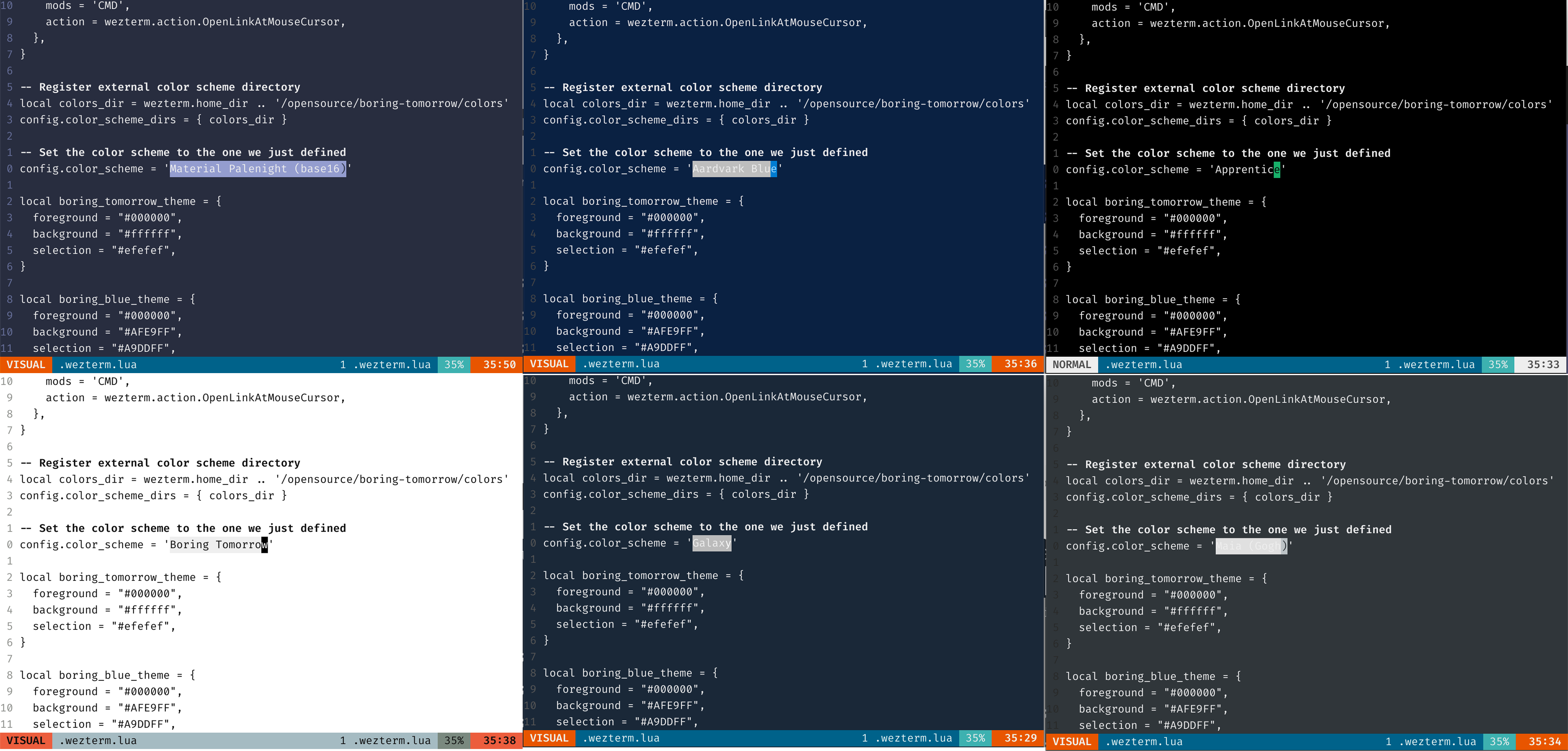
I changed the theme recently to use terminal colors instead of colors set in neovim, splitting things I want to highlight from the the colors I like. Incidentally, this brings dark mode switch a problem of the terminal.
TL;DR:
Terminals support hex colors, it doesn’t mean I should use them
In 2026, basically all terminals support all the same colors as browsers. It was an achievement when the standard was made and implemented. Before, it was just a limited set of colors and people just lived with them. I suggest we treat this limited set as a lucky state of the world where most of the apps will use colors from the same palette.
Digression: Color palettes in web
…do not exist globally. There are default styles and default color names, but you can’t bring your own palette and repaint the whole internet just for yourself. But, css is really flexible and vast, and people and companies definitely wanted to reuse styles for their different sites.
I believe there is very little secret in how css works but in case you’re one of the lucky 10 000, you can import a css on the website and it will be applied. Additionally, many people use standardised design tokens that include colors, fonts, and sizes. One abstraction layer on top of the tokens are components that are often specified with more than just css. If we only talk about color palettes, the most influential ones are from Bootstrap and Tailwind, but there are literally thousands out there. Julia Evans has an opinionated collection.
From the other side, people wanted to apply all sorts of patches for different sites just for themselves, and there is a word userstyles for the css part of that. Adblock is weirdly in the same group because annoying parts of the websites often deserve to be hidden rather than polished.
So what I’m saying is, terminals are lucky to have a standard overridable set of colors. Web would be one dimension more flexible if it had a similar thing. There is one for fonts, if you set font-family: serif browser will use the font from the browser settings. You can even force pages to use your fonts instead of whatever they do. It used to break icon fonts (wasn’t awesome of fontawesome) but icon fonts are out of fashion now and this option is not a joke anymore. To try in Firefox, uncheck Fonts -> advanced -> Allow pages to choose their own fonts, instead of your selections above.
16 colors ought to be enough
Terminals emulators are old. Important consequences of it are that they are severely backward-compatible, and that there are many CLI apps that want to be run on anything and use backward-compatible colors.
For the purpose of having a global overridable color palette, there are 256 colors that are supported everywhere, and they are one way or another derived from 16: black, red, green, yellow, blue, magenta, cyan, white, and “bright” versions of them. So, you could say there are only eight basic colors but in practice you want to define 16 as foregrounds and backgrounds.
To expand the palette to 256 colors you could use all the tricks you want. Traditional definition is an rgb cube:
# quoting the wikipedia page above
  0-  7:  standard colors (as in ESC [ 30–37 m)
  8- 15:  high intensity colors (as in ESC [ 90–97 m)
 16-231:  6 × 6 × 6 cube (216 colors): 16 + 36 × r + 6 × g + b (0 ≤ r, g, b ≤ 5)
232-255:  grayscale from dark to light in 24 steps
Web devs got nicer ways to generate palettes. There is a huge topic of color spaces, the current state of the art is oklch. We won’t dig into there, the only color we use from the extended palette is 255 for black, because black(0)+bold is drawn as gray according to some (same?) ancient protocol.
Making a terminal colorscheme
Aside of the colors already mentioned, there are more:
- background and foreground
- cursor background and foreground
- selection background and foreground
They belong to the colorscheme but are not accessible from the apps. There is an obvious reason for that, but it adds the assumption that all these colors match the rest of the palette. It’s not always the case, and e.g. wezterm even has an option to ensure contrast ratio and override some of the colors if background is too close to the foreground.
To test your palette there are age-old scripts, e.g
#!/bin/bash
#
#   This file echoes a bunch of color codes to the
#   terminal to demonstrate what's available.  Each
#   line is the color code of one forground color,
#   out of 17 (default + 16 escapes), followed by a
#   test use of that color on all nine background
#   colors (default + 8 escapes).
#

T='gYw'   # The test text

echo -e "\n                 40m     41m     42m     43m\
     44m     45m     46m     47m";

for FGs in '    m' '   1m' '  30m' '1;30m' '  31m' '1;31m' '  32m' \
           '1;32m' '  33m' '1;33m' '  34m' '1;34m' '  35m' '1;35m' \
           '  36m' '1;36m' '  37m' '1;37m';
  do FG=${FGs// /}
  echo -en " $FGs \033[$FG  $T  "
  for BG in 40m 41m 42m 43m 44m 45m 46m 47m;
    do echo -en "$EINS \033[$FG\033[$BG  $T  \033[0m";
  done
  echo;
done
echo
Which produces a pic like the following
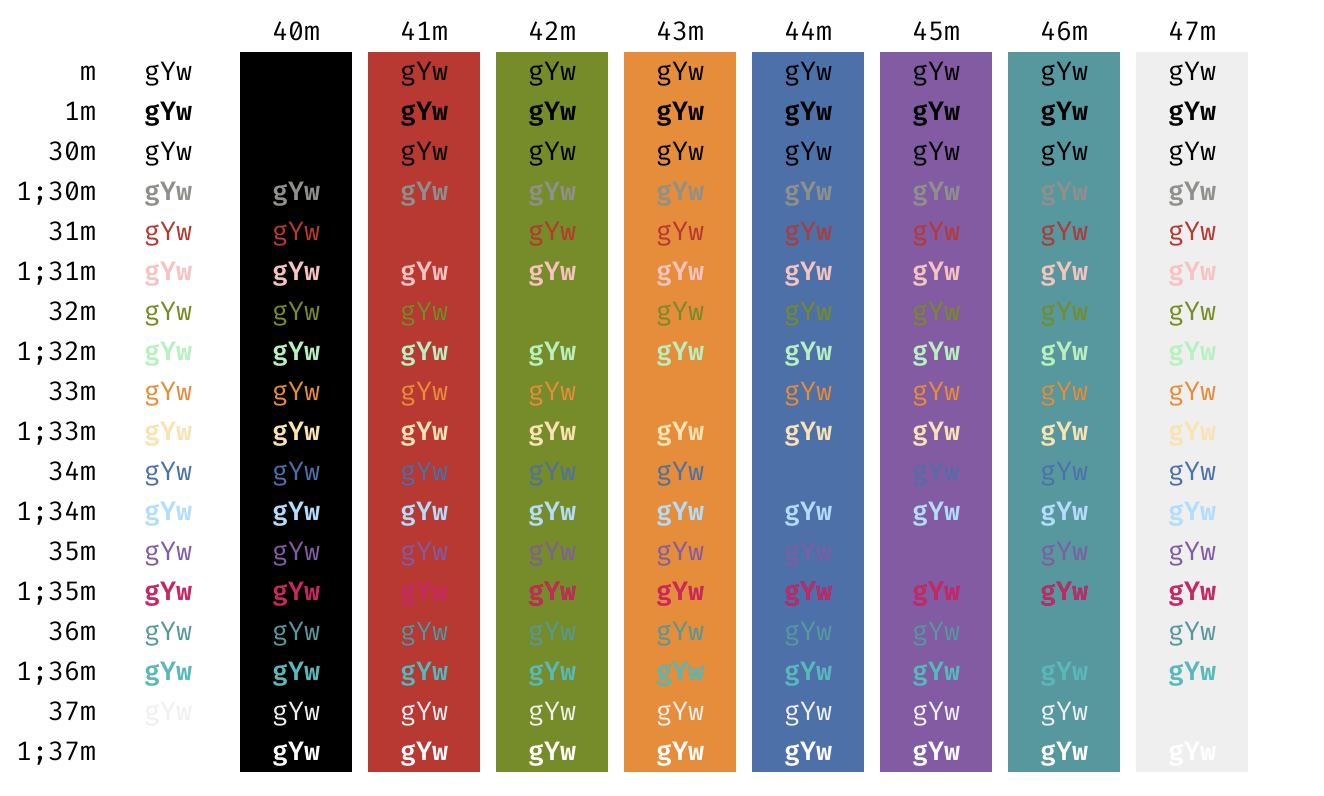
At this point you are supposed to change colors until you like the output. I am almost sure I took Tomorrow colors years ago and tweaked black and white to be #000 and #fff.
Sidenote: People go great lenghts not to use terminal colors sometimes. It removes the assumption that your theme colors are well aligned, and it’s impressive that it works automatically. I don’t think you should fight terminal colors though, you probably figured already.
Neovim supports hex colors, it doesn’t mean you should use them
Okay now, neovim. There is a concept of highlighting groups which accepts all the colors you want. Generally speaking, this makes sense. Neovim can be embedded or run in a GUI, and thus doesn’t have to have terminal colors available. But I never do any of that, for me neovim always runs in wezterm, and it’s only natural to set colors once instead of aligning palettes (more than once, there are plugins that need separate setup, I use fzf and lualine).
More important is that things I want to highlight don’t match most of the other colorschemes. I am happy to only highlight comments, search, selection and some UI and have most of the things default foreground on default background. I made a colorscheme and wrote about it. Using terminal colors, I could promote this idiosyncrasy across different themes – you could have your Catpuccin colors with Boring Tomorrow principles! You could switch between dark and light modes. You could try new themes without code highlighting being odd. You could make your own themes.
Technical details
All the things neovim are better solved with reading the fucking manual. So,
:help termguicolors
:help nvim_set_hl
:help highlight
:help colorscheme
There isn’t much to describe, for my case it’s a pretty dull change from hex to term colors. For the record, here are things I stumbled upon:
- To make neovim colorscheme use terminal colors, set
termguicolors = false; - Bold + black (1) is displayed gray. I ended up using 255 for comments.
- For default background and foreground you can use “NONE”
- lualine supports both highlight groups and any colors for its themes. I used colors because the combinations aren’t used anywhere else.
The result lives in the same gist as before.
UPD: and the colors for wezterm are in another gist.
Sources
- man terminal-colors
- bag of tricks for terminals from jvns. Problem 11 is the colors in vim. Julia solves it with using standard hex colors, we don’t want that.
- wezterm can bend colors for contrast
- how to test for contrast
- oklch for terminal colors